Coming soon to Mac

Your own office
of AI agents.

Hire agents into departments and give them tasks. They plan, build and review each other's work while you watch in the Live office.

The Engineering floor painted in pixel art: an agent presents a plan at a whiteboard while two colleagues work through code.
Northwind sample office · Live office
Live

Runs on the AI subscriptions you already have

One Claude subscription is enough to start.

How it works

From one task
to a finished delivery

You decide what gets done. Your agents plan it, build it, check it and hand you a report.

On the painted Engineering floor of the Northwind sample office a glowing task card lands on Hugo the lead's desk, and Nova and Rio turn to look while Mika works on a laptop behind them
Say what should change, in plain words. Let the lead decide who works on it.

Departments

Four departments,
one office

Hire agents into the departments you need. Your lead brings in the ones each task needs.

The Engineering floor: an agent presents a plan at a whiteboard while two colleagues work through code.

Engineering

Builds and reviews code.

  • Lead
  • Engineers
  • Reviewer
The Creative floor: agents point at colour studies on the wall and on a screen while a designer sketches on a tablet.

Creative

Designs looks, images and video.

  • Director
  • Designer
  • Image maker
  • Motion
The Marketing floor: an agent points at a board of notes while colleagues work through a campaign.

Marketing

Writes copy, posts and launch plans.

  • Strategist
  • Copywriter
  • Content
The Finance floor: an agent explains a chart on a whiteboard while colleagues check numbers on their screens.

Finance

Works out pricing models and numbers.

  • Controller
  • Analyst
  • Bookkeeper

Why an office

An office that
works like one

A shared plan, checked work and room to grow across your Macs and accounts.

The Engineering floor of the Northwind sample office in the detailed pixel look: agents at their desks, each with its name tag.

Agents with a shared plan

Your AI agents plan, build and review work together, with a lead to organise each task.

The Engineering, Creative and Finance floors of the Northwind sample office, each working at the same time.

Put your other Macs to work

Your other Macs on the same local network can run some of your office's agents.

The Live office on a phone beside the Creative floor of the Northwind sample office.

Your office on your phone

Phone apps for iPhone and Android are in development, so you can follow your office and answer questions away from your Mac.

The Reviewer agent card beside a task it accepted: Subscription audit 2.

Checked before you decide

The office runs your project's checks and an independent agent reviews the work before you accept it or ask for changes.

The language setting with English and Bahasa Indonesia, beside the Finance floor of the Northwind sample office.

Choose your office's language

Use the office dashboard in English or Bahasa Indonesia.

Codex and Antigravity set to their specialised jobs, and Engineering with every job on its own agent.

Share the work across subscriptions

Fasboard checks allowance before assigning work and considers account workload when an agent needs cover.

Inside the app

Your whole office
in one window

Home shows what is moving and what needs you. The board follows every task. The Live office shows your agents at their desks.

Fasboard Home page of the Northwind sample office in light mode, on a laptop: Working now, Needs you and Ready to test cards above the Projects grid
HomeWhat is moving, what needs you and what is ready to test, across every project.
Fasboard task board of the Northwind sample office in light mode, on a laptop, with the Ideas, Backlog, In progress, Attention and answers, and Review and done columns
Task boardEvery task in a column, from idea to review and done.
Fasboard Live office floor of the Northwind sample office in dark mode, on a laptop, with agents at their desks under their name tags
Live officeYour agents at their desks, in light or dark mode.

See it work

Watch the office at work

A 30-second film, and the Live office as it looks on a phone. They have no sound. The phone apps are in development.

Fasboard in 30 secondsFrom a brief you write to a delivery you accept.
Live officeEvery agent at its desk. Tap one to see what it is working on.
Follow an agentFollow one agent around the floor, here in dark mode.
Every floorEach department works on its own floor. Switch floors with a tap.

Built around you

Each AI tool for
what it does best

The best tool for each job

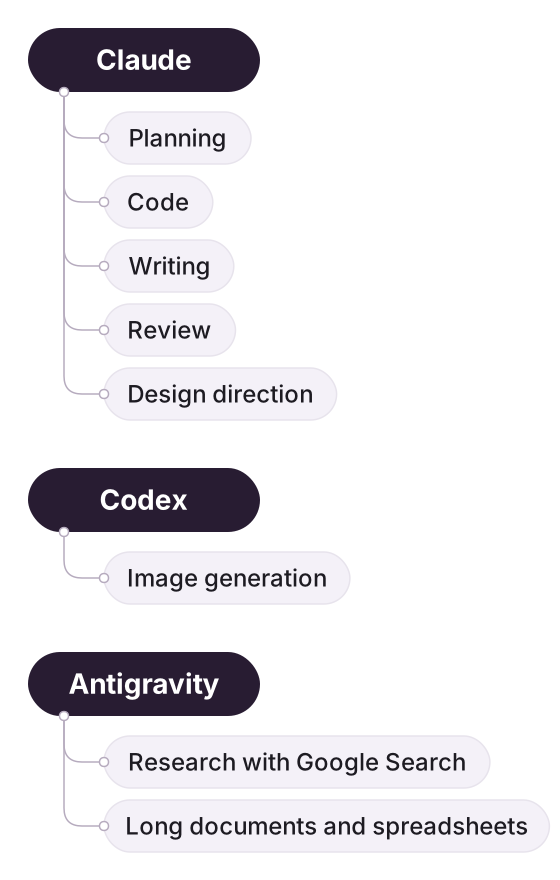
Fasboard suggests which tool does each job and spreads your agents evenly over your accounts: Claude for planning, code, writing and review; Codex for images; Antigravity for research and long documents.

Diagram of jobs going to tools: planning, code, writing and review to Claude; image generation to Codex; research and long documents to Antigravity

One board for every project

Every task in a column, from idea to review and done. The questions that need you come first.

A Working task in the In progress column of the Northwind task board.

Your work stays yours

Office data lives in a folder on a drive you choose. Your sign-ins stay on your Mac. Nothing lands in your project until you accept it.

Diagram of your Mac: the app, the office data folder, your project folder and your sign-ins, with only the work an agent needs going to its AI tool

Checked and accepted by you

One task is ready for your test. The one next to it is accepted. Every delivery comes with a report you can read before anything changes.

A task marked Ready for your test next to an accepted task

Fasboard is an independent app, not affiliated with Anthropic, OpenAI or Google.

FAQ

Questions and answers

What is Fasboard?

Fasboard is an office of AI agents on your own Mac. You hire agents into departments and give them work as tasks. They plan, build and review each other's work while you watch in the Live office.

Can I download Fasboard today?

Not yet. Fasboard is in early development. When the Mac app is ready, the download will appear on this site.

Which AI subscriptions do I need?

Fasboard runs on the Claude, Codex and Antigravity subscriptions you already have. One Claude subscription is enough to start. During setup, you sign each agent in to its AI account.

What happens when I give the office a task?

The lead plans the task before any agent builds it. Agents do the work, the office runs your project's checks, and an agent that did not do the work reviews it. Then you get a delivery report.

Does my project have to be a Git repository?

No. A code project is a Git repository, but you can also add any plain folder of documents, images or other files.

Will there be phone apps?

Yes. Phone apps for iPhone and Android are in development, so you can follow along with your office away from your Mac.

What does Fasboard cost?

Fasboard is in early development. Pricing will be published on the Pricing page before release.

Your office is
almost ready.

Fasboard for Mac is coming soon. Phone apps for iPhone and Android are in development. Windows and Linux are planned.

  • MacComing soon
  • iPhone and AndroidIn development
  • Windows and LinuxPlanned